Identify and Mitigate DDoS Attacks Using Azure WAF
&edge_flat=false)
DDoS attacks have become common, and I don’t have to explain the importance of having a DDoS mitigation and protection service when you run a mission critical workload. Recently, Microsoft blocked 15.72 Tbps DDoS attack.
Once you host a web application on Azure and enable DDoS protection, you’re covered to a large extent, however my suggestion is to ensure you remain vigilant and continuously refine your WAF policies while validating the logs to find if there was any DDoS attack. In this blog, we’ll cover how you can identify the IPs that triggered a DDoS attack or if there is any abnormal traffic that requires investigation. Also, we’ll find out how you can block traffic once you find something during the investigation as a DDoS attack can reoccur within a few hours or days.
KQL Queries
The following KQL queries will help if you’re using Azure Front Door and have enabled diagnostic settings to send logs to Log Analytics Workspace.
- Get the report by clientIP
This query will help you dig the logs from a day and summarize it by client IP. It’ll give you multiple percentiles 95, 99,100 through which you can investigate whether certain IP was responsible for lots of requests. You can change the time generated to few hours if you’ve seen huge request recently.1 2 3 4 5 6
AzureDiagnostics | where TimeGenerated >= ago(1d) | where Category == "FrontDoorAccessLog" | summarize count() by bin(TimeGenerated, 5m), clientIp_s | summarize percentiles(count_, 95, 99, 99.9, 100) by bin(TimeGenerated, 1h) | render timechart
- User agent based traffic
Below command is useful in analyzing if you’ve been receiving request from specific user agent, User agent strings can be modified easily; however, this helps identify if a single user agent type is generating unusually high traffic.1 2 3 4 5
AzureDiagnostics | where TimeGenerated between (datetime(2025-11-20 21:00) .. datetime(2025-11-20 22:00)) | where Category == "FrontDoorAccessLog" | summarize count() by userAgent_s | top 100 by count_
- Traffic based on RequestURI
One way to identify a DDoS attack is to check whether the traffic being received is legitimate. Using below KQL query you’ll get if you’re receiving request for a URI which you don’t serve. A very common approach is, attackers send requests such as www.azuredoctor.com:443/?lang=en-NZ through automated bots, even though you don’t serve that page of ?lang=en-NZ.1 2 3 4 5
AzureDiagnostics | where TimeGenerated between (datetime(2025-11-20 21:00) .. datetime(2025-11-20 22:00)) | where Category == "FrontDoorAccessLog" | summarize count() by requestUri_s | top 1000 by count_
- Blocked by WAF rules
If you’ve enabled WAF then below query will show you a list of WAF rules which has blocked requests along with their count.1 2 3 4 5 6
AzureDiagnostics | where TimeGenerated >= ago(1d) | where Category == "FrontDoorWebApplicationFirewallLog" | where action_s == "Block" | summarize count() by ruleName_s | sort by count_ desc
Custom WAF rules
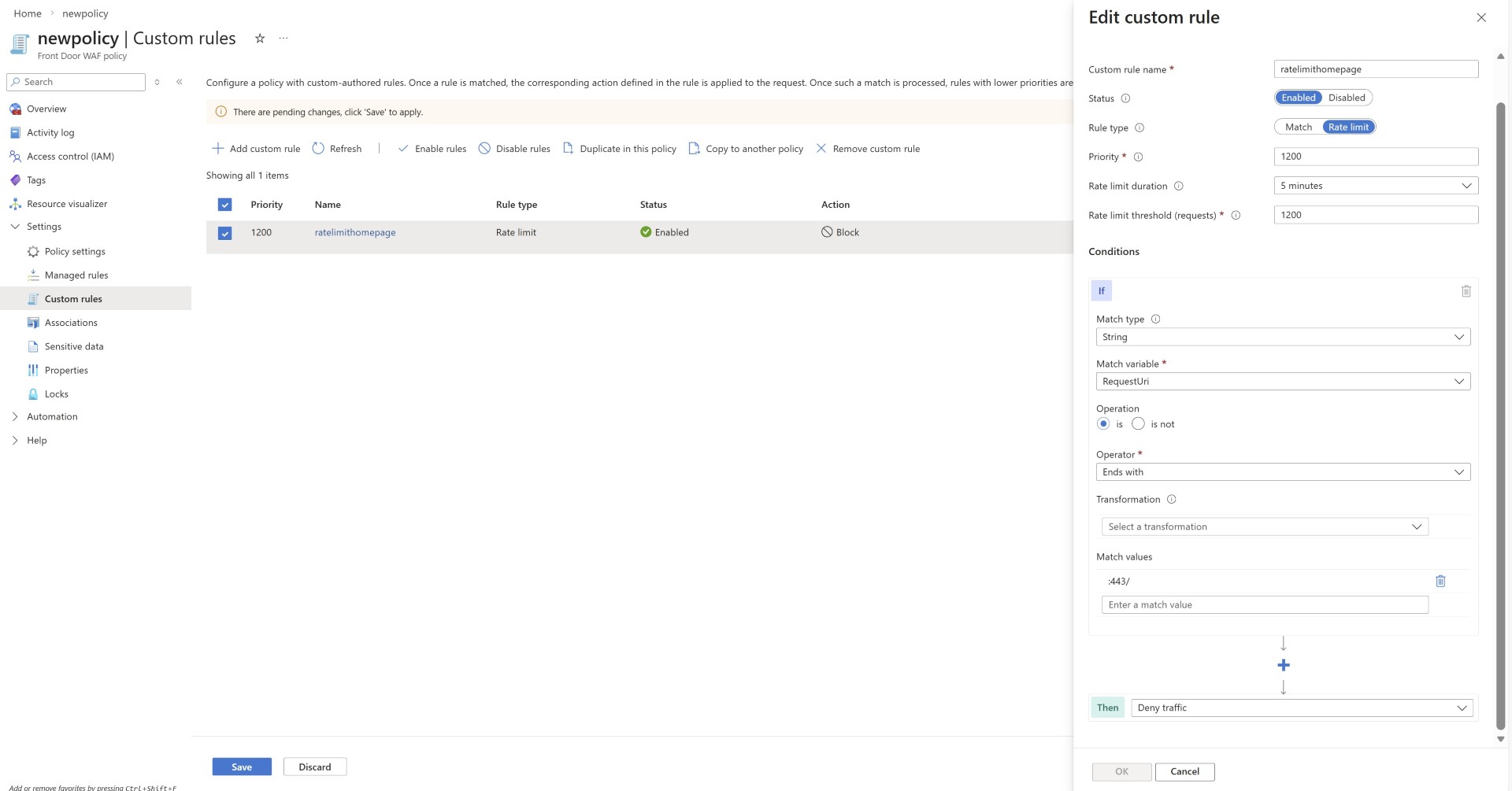
- Rate limiting the homepage can help mitigate DDoS attacks, as attackers typically target the homepage. If your homepage is not cached intentionally or unintentionally and requests directly hit your origin server then this setting of rate limiting your home page can help you in many ways.
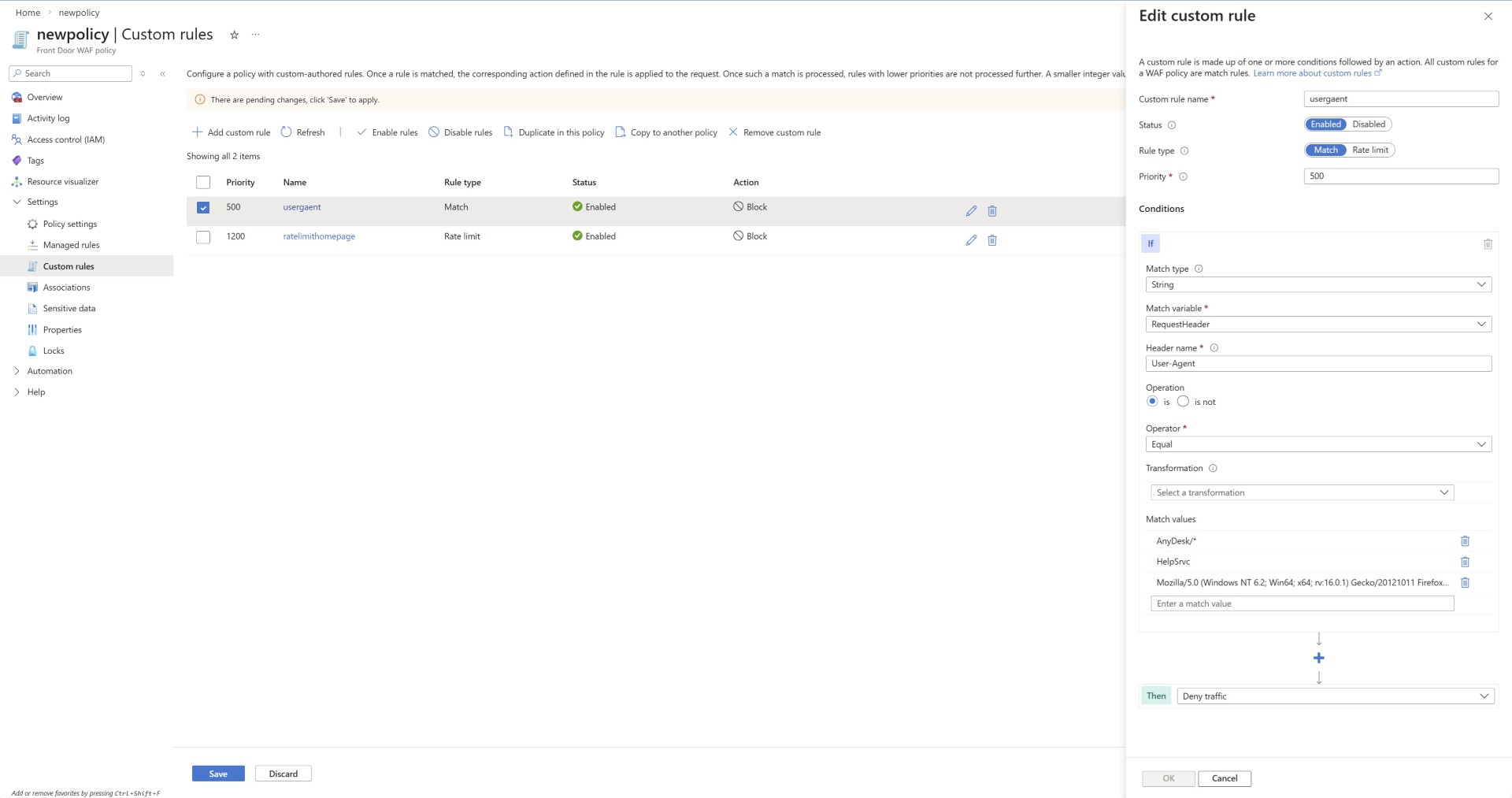
- Blocking malicious user agents is one of the methods, although nowadays attackers change the user agent however this can help you. Also if you’ve found traffic from malicious user agent using the WAF logs shared above then you can use this rule to block specific user agents.
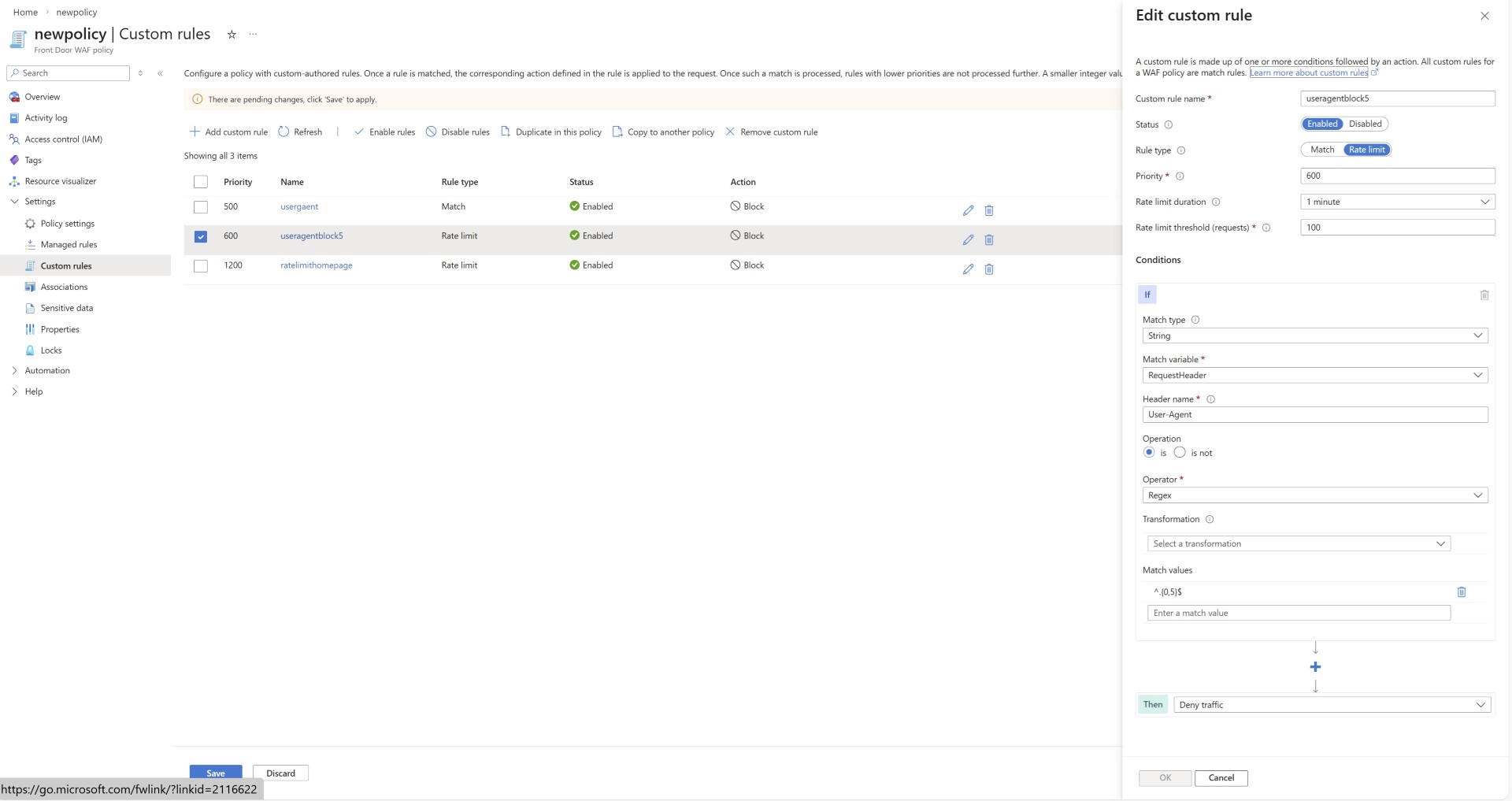
- User agents with unusually short character lengths should be blocked.
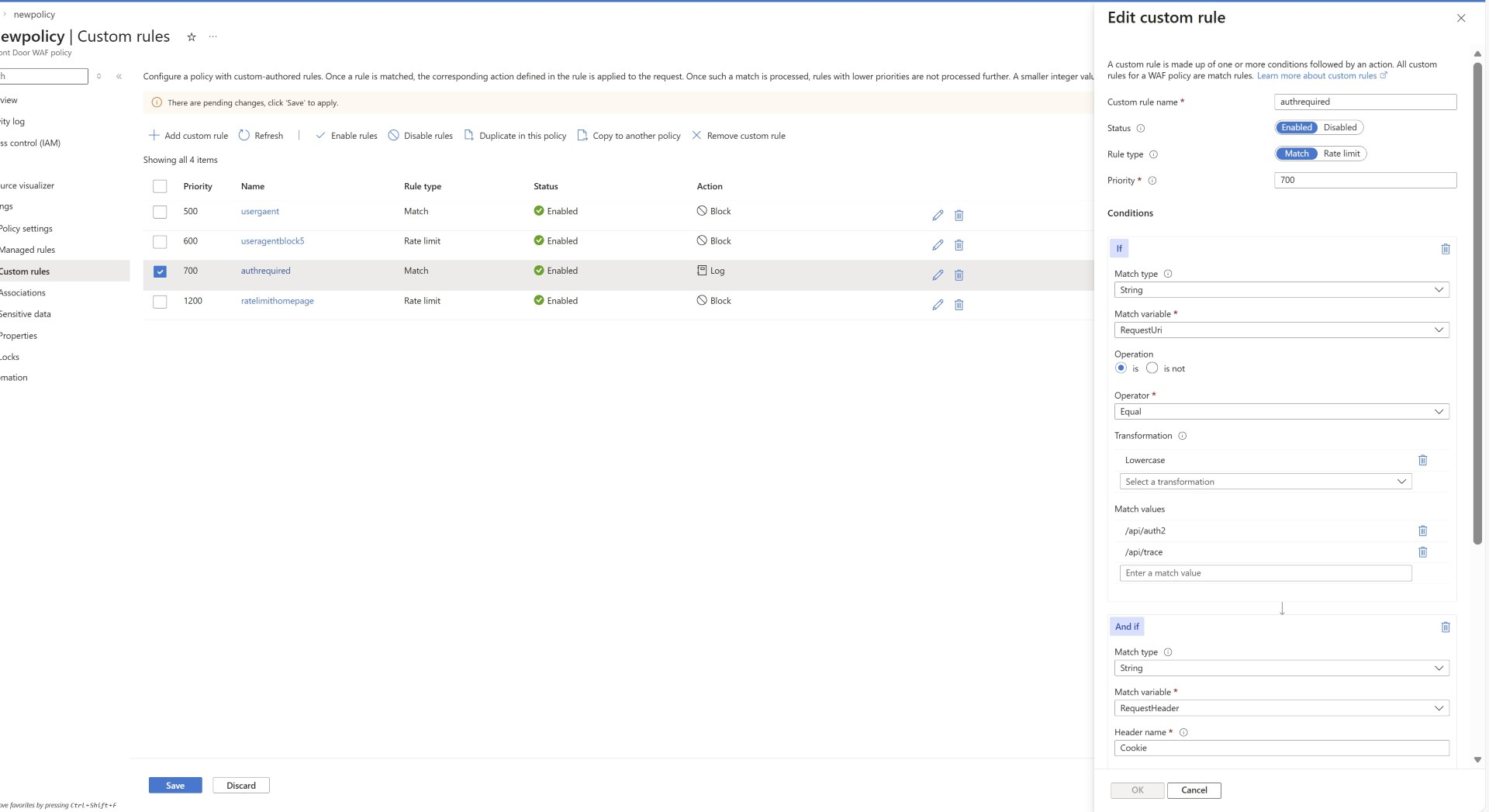
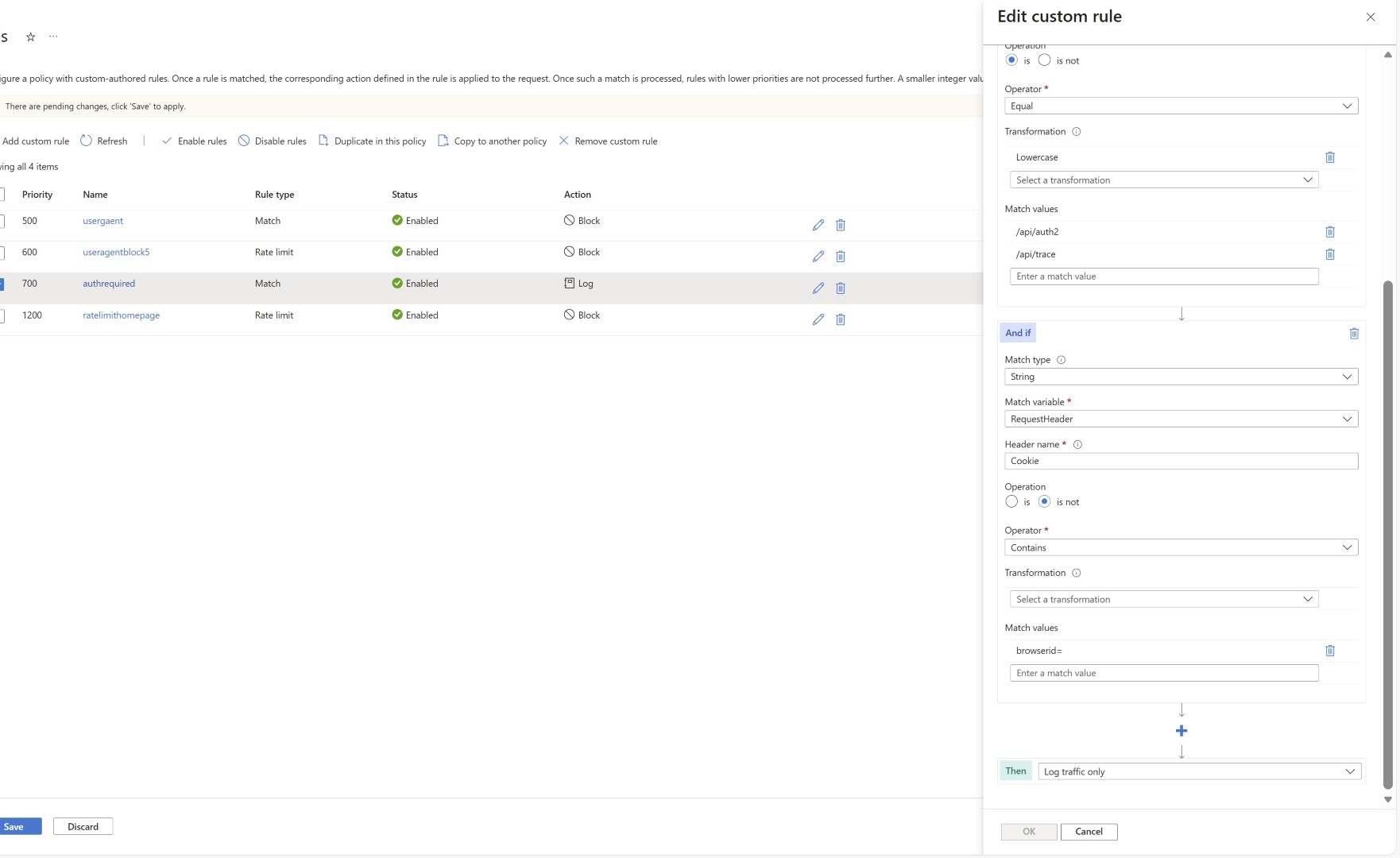
- Web page URLs that require authenticated access but are being accessed without authentication can be blocked. First you can log the traffic and understand the pattern and then take a call to block.
Private connectivity to Origin
If you’re using Azure front door, it is recommended to put the origin servers or services which supports private endpoints to be enabled with private connection from AFD. This helps block unwanted traffic hitting your web server directly, ensuring that only traffic from Azure Front Door is accepted. Try to make sure most of your web page is cached by AFD. This strengthens your DDoS protection posture.
I hope this guide helps you identify DDoS activity and provides useful mitigation approaches.
Happy Learning!
Subscribe to my newsletter for the latest posts and summaries. Your privacy is paramount, and your email stays with us securely. click the link to submit your email. https://forms.office.com/r/6ysKm4nkp4