Automatically block suspicious DNS activity using Azure DNS
&edge_flat=false)
Scenario: One of my customers came with a requirement to have a resilient DNS service which will be used to get the public DNS record and the response will be provided to the end user clients. They were currently using two DNS Servers which were hosted in a DMZ environment but they found that the system was unstable and was causing downtime. Hence, they wanted a resilient service, and at the same time, they wanted DNS security inbuilt so that the responses are monitored and malicious DNS responses are blocked by the service. This wasn’t provided by their current solution.
Solution: In our solution, we’ve factored a couple of services to meet the requirement. Majorly Azure Private DNS Resolver and DNS security policy. Both the services are managed services, without needing patching and maintenance. Azure Private DNS resolver will be used to serve the recursive queries from DNS servers and provide the public DNS records or records present in Azure Private DNS Zones.
let’s explore both the services in brief and how it fits in the overall architecture.
Primary Services Involved
In this section, we’ll cover all the major services involved in this setup.
Azure Private DNS Resolver
Private DNS resolver is not a new service, mainly used when you’ve an Azure Private DNS Zone setup for private endpoint name resolution and your client is sitting on-premises and trying to resolve Azure private endpoint IP address.
In an on-premises scenario DNS server present on-premises can’t directly use DNS Forwarder method and point to the Azure’s wire server IP of Azure to get the private DNS zone record. Hence, it has to be pointed to a DNS server hosted on Azure which has reachability to the wire server IP address of Azure. Instead, DNS server on Azure can be replaced with Azure private DNS resolver which will send the query to Azure wire server IP and give the record to on-premises DNS server which in turn sends the response to DNS Client. This is a short description of Azure Private DNS Resolver Inbound endpoint.
You would ask how Private DNS Resolver will help in the current customer scenario. The same service can help resolve public DNS records as well. If you’ve on-premises DNS Server which sends the request to DNS server in DMZ environment and that DNS server then sends the request to ISP DNS Server to get the public DNS record, you can replace the DNS server in the DMZ environment and send the request directly to Azure Private DNS resolver to get the public DNS record. If you don’t have an Azure private DNS zone and private endpoint scenario, it’s fine if you use this setup only for public DNS name resolution.
You can learn more about APDR here:
https://learn.microsoft.com/en-us/azure/dns/dns-private-resolver-overview
Azure DNS Security Policies
DNS Security Policies is a new feature that recently went GA, basically, you create a DNS Security Policies and then attach that to a VNET which hosts your VMs or Private DNS Resolver. Once it gets attached, whenever a machine reaches Azure DNS to get the DNS record it’ll be inspected by Azure DNS Security Policies service which checks the DNS list and blocks the resolution of the record or just audits it and saves it in Azure Monitor. It can be directly the Azure VM or Private DNS resolver service which resides in the VNET which is doing a DNS lookup.
We’ve created DNS list and entered all the domains which needs to be blocked.
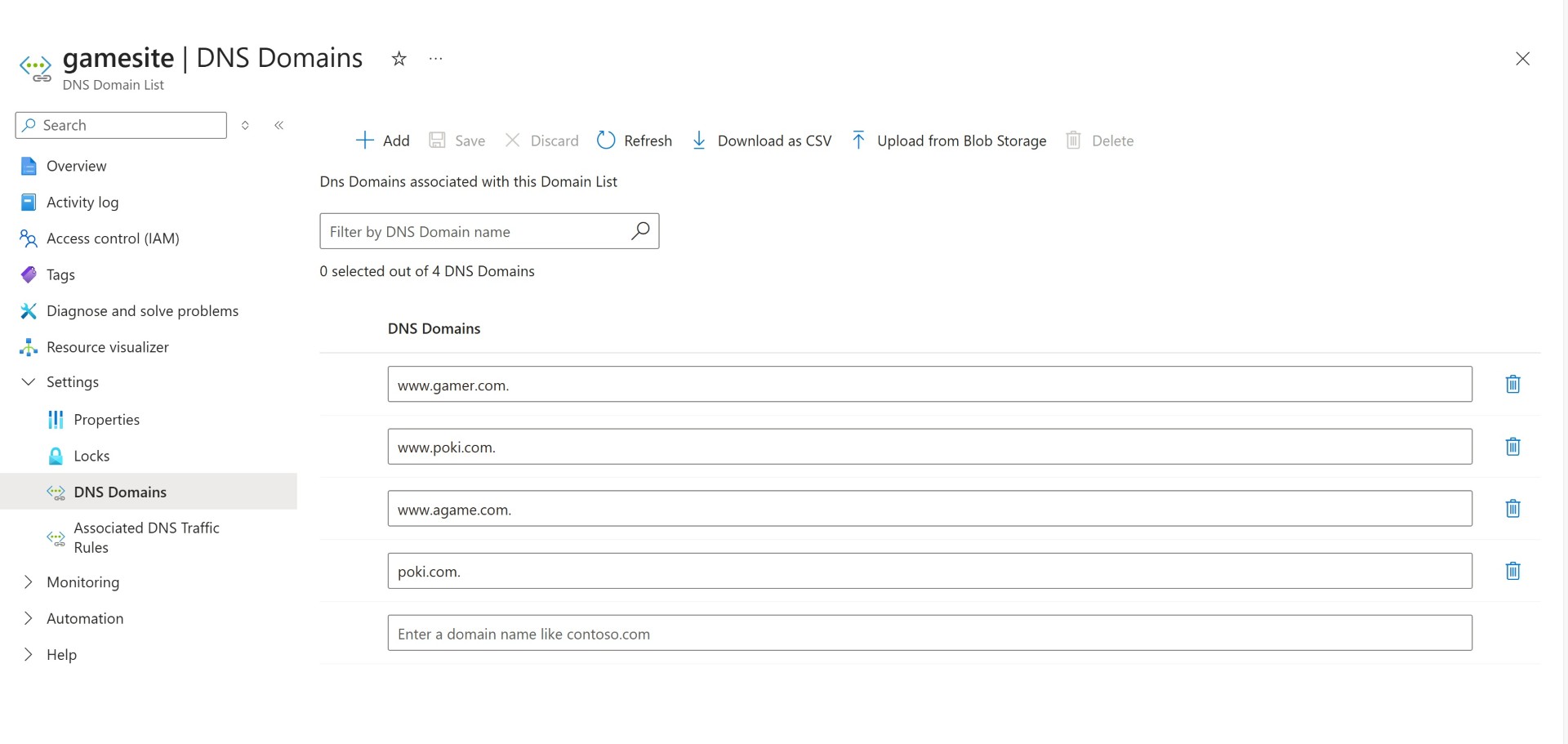
The same DNS list is linked to DNS Security policy.
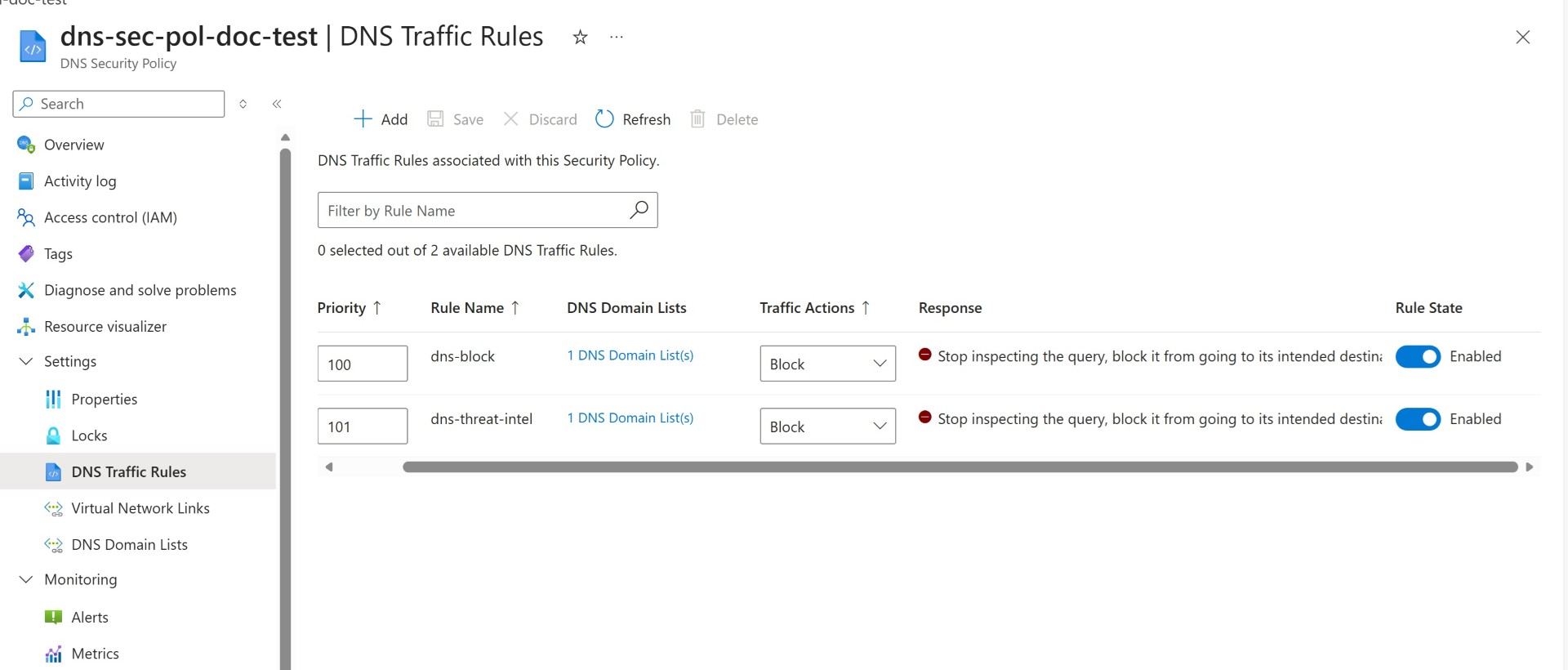
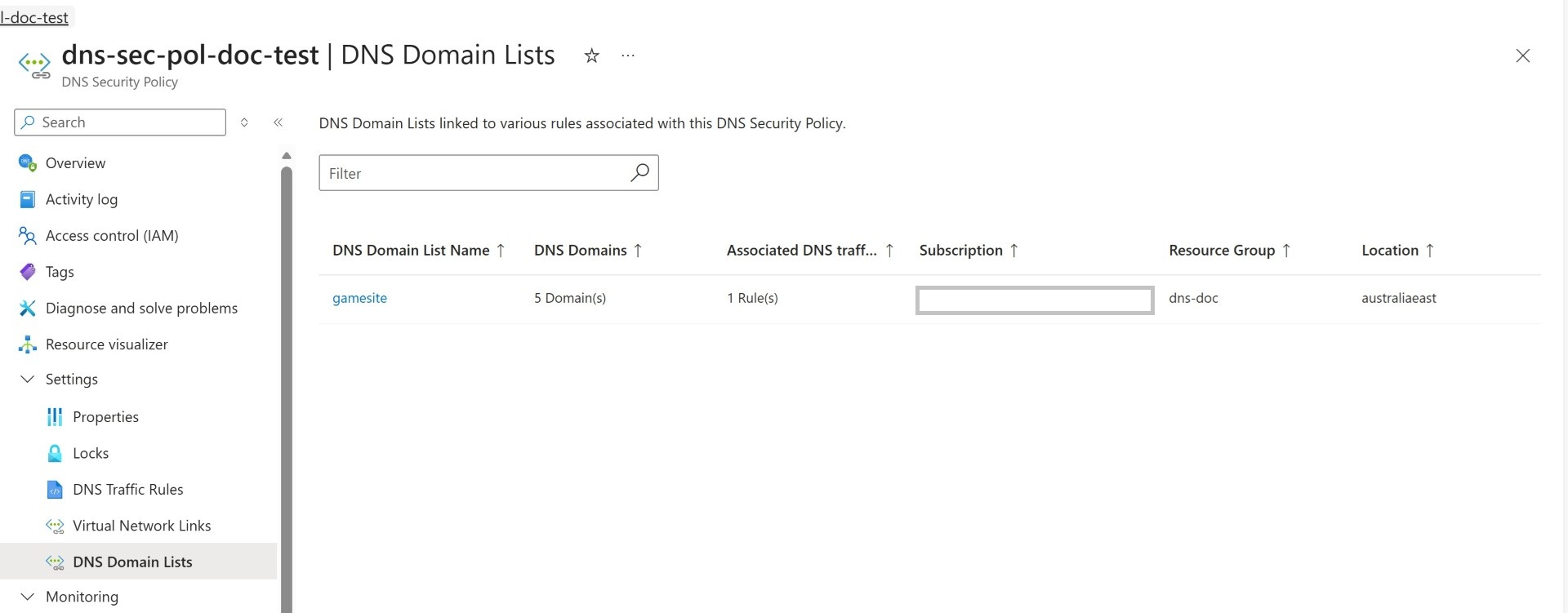
Validate all the DNS list link to the security policy.
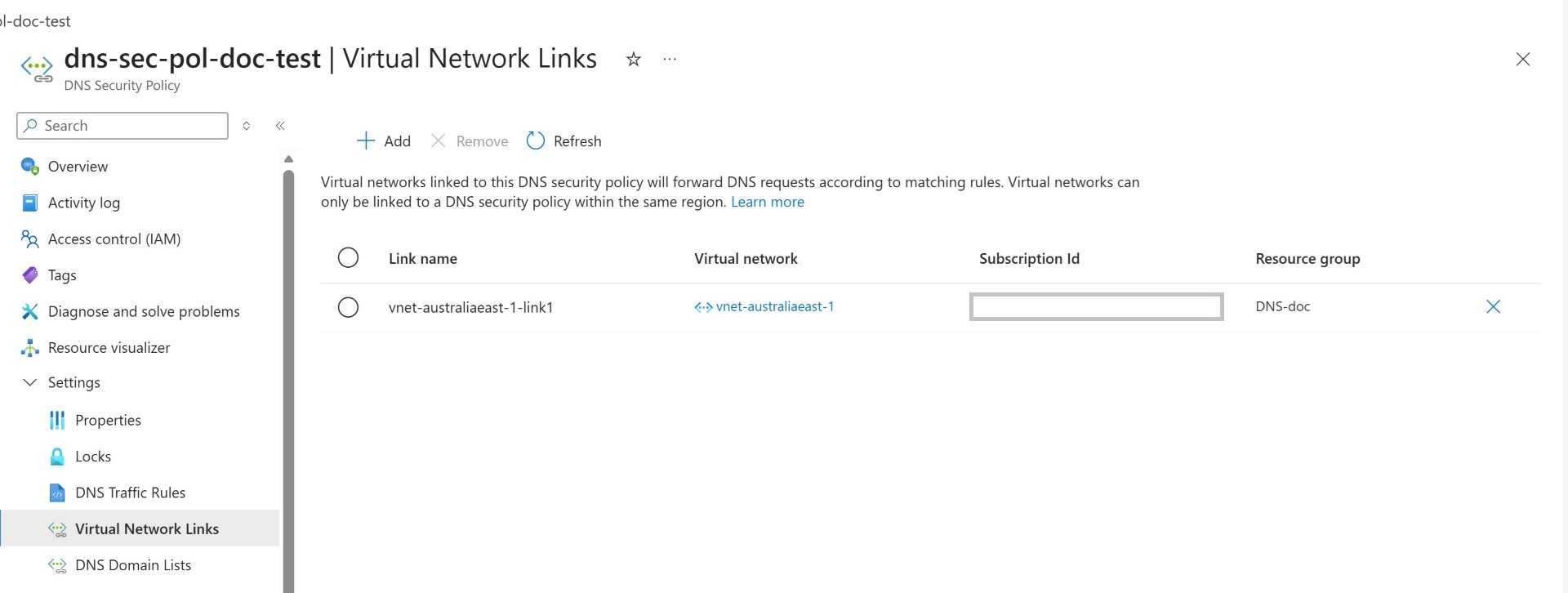
Link the VNET to the DNS security policy. This is the last step and our configuration is done.
Now you can validate by performing nslookup that the DNS name which you’ve entered in the DNS list won’t be resolvable.
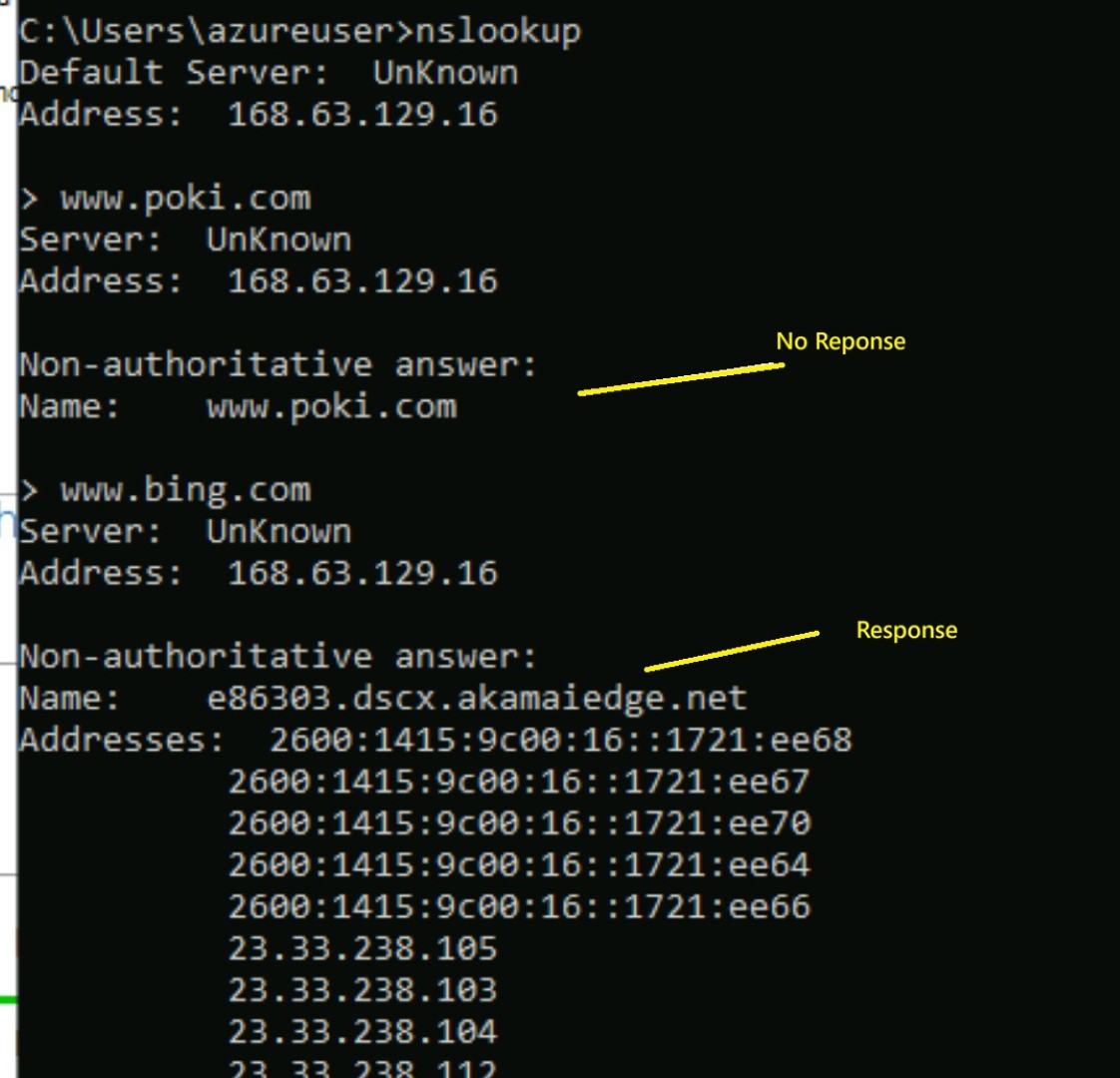
And the same can be checked in the Azure Monitor logs.
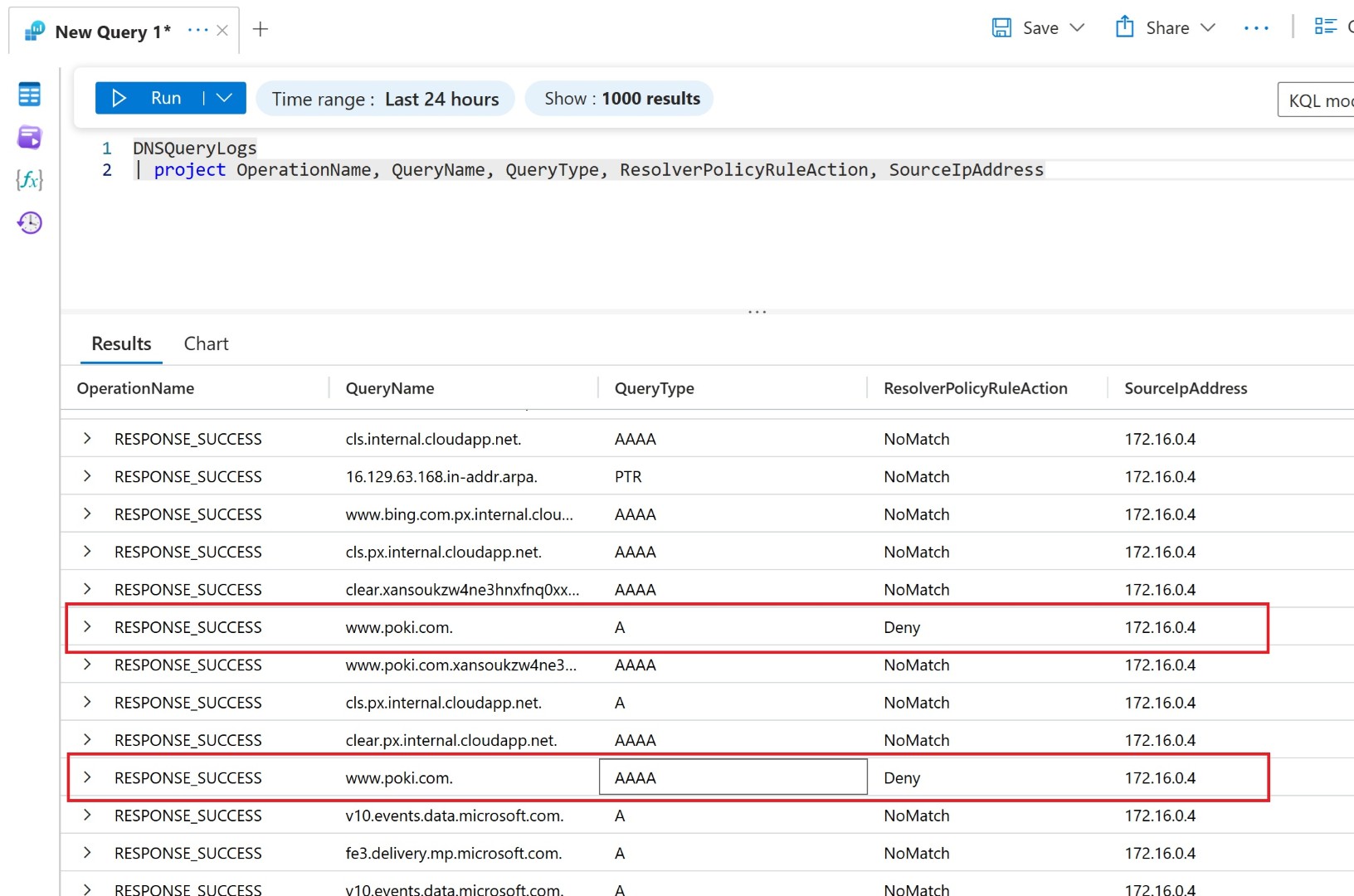
More information is present in the below article:
https://learn.microsoft.com/en-us/azure/dns/dns-security-policy
As we’ve gone through the primary services for this architecture, let’s discuss the overall flow of the DNS traffic and services involved.
The below diagram shows Azure Private DNS resolver inbound endpoint and VNET associated with Azure DNS security policies, AD integrated DNS server on-premises will be forwarding DNS requests to private IP of the Private DNS resolver.
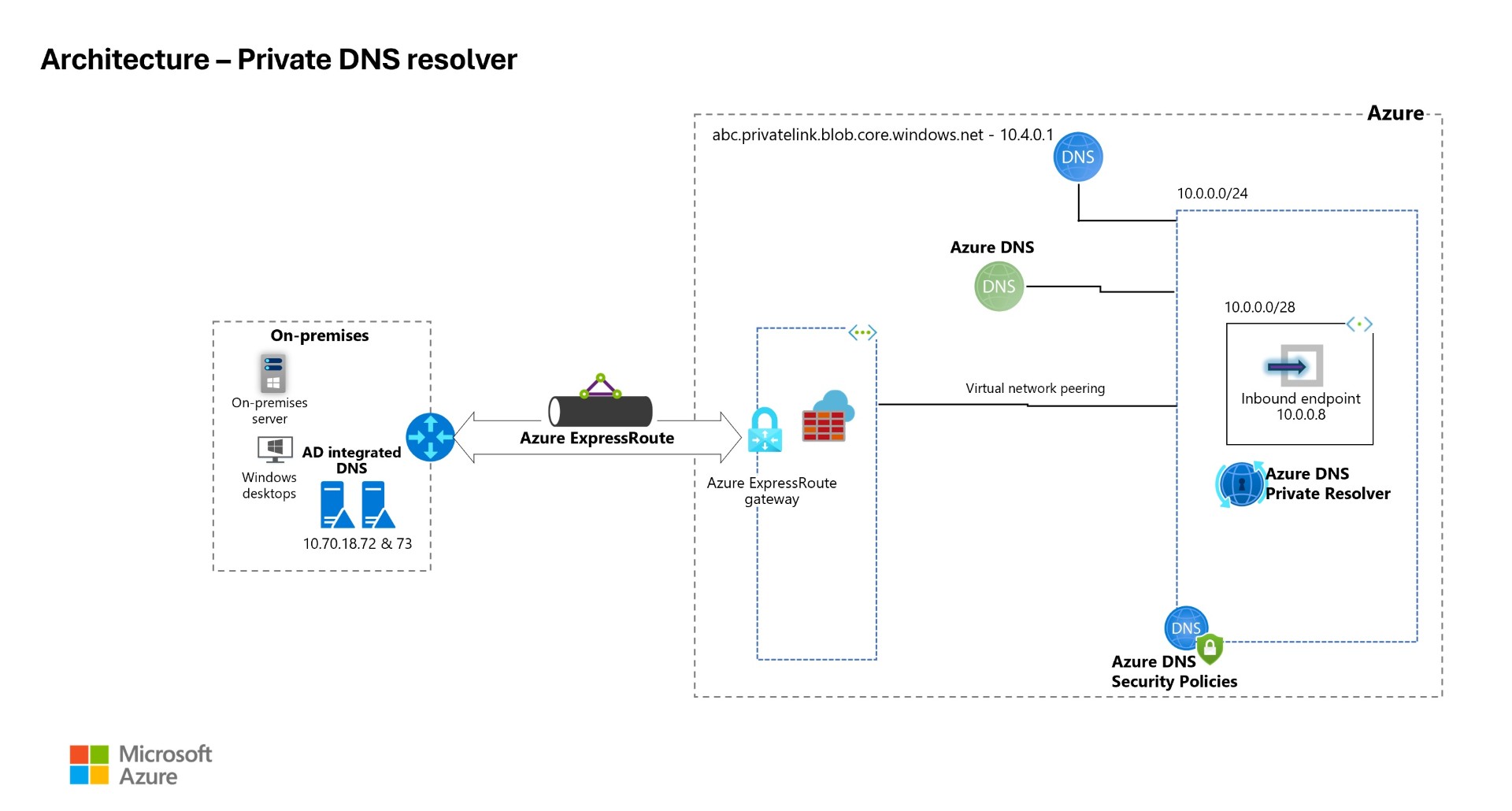 Download the architecture diagram
DNS Query Flow
On-premises DNS Security
This flow is exactly the scenario described in the scenario section at top of the blog, On-premises DNS server using DNS forwarder and sending the queries to Azure Private DNS resolver service which then sends the request to either Azure Private DNS zone or to Public DNS Name server for name resolution. While doing so, when it reaches Azure DNS because of the DNS security policies, it either blocks or audits the DNS queries.
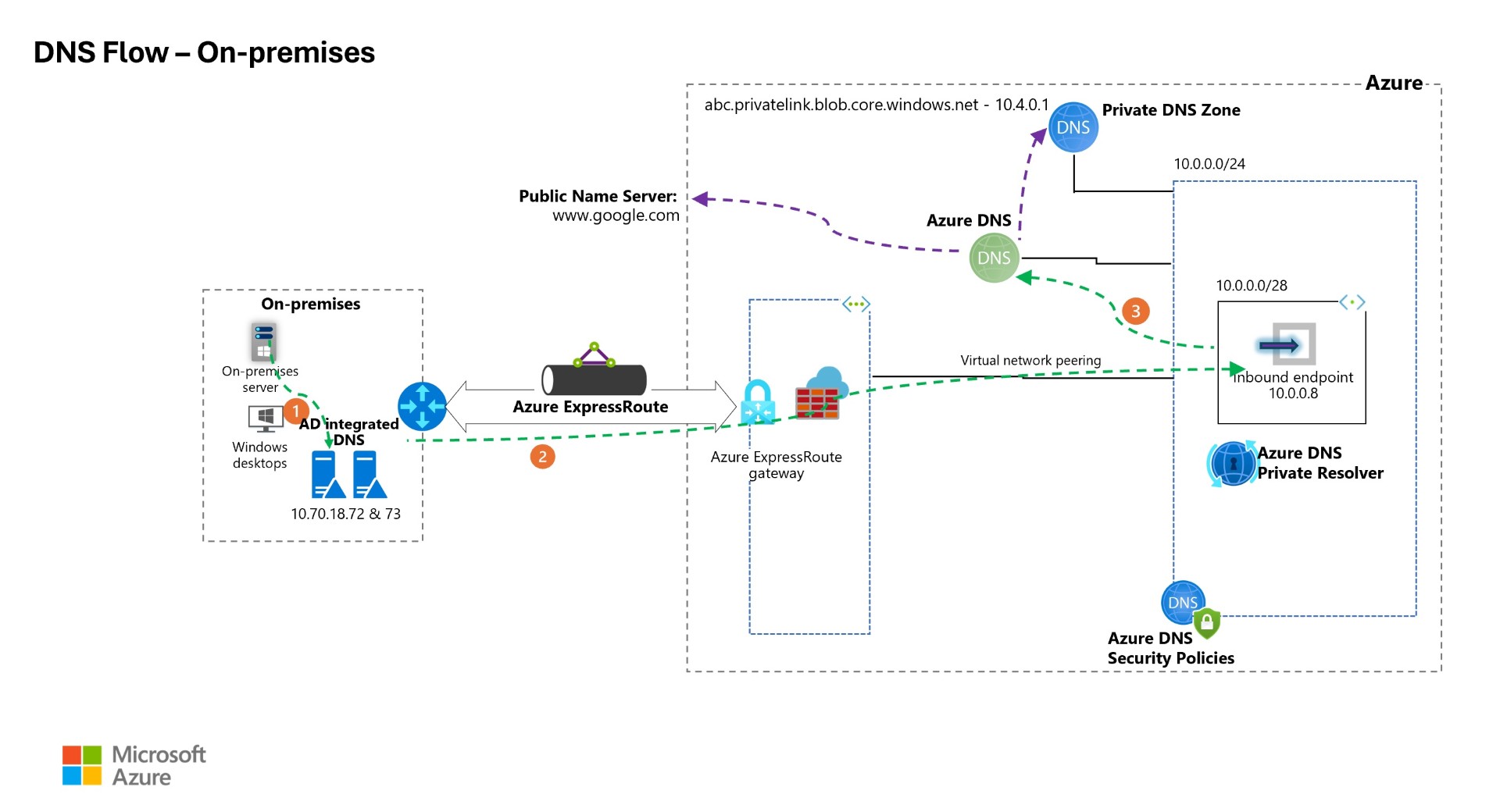 Download the architecture diagram
Azure Spoke VNET DNS security
This section describes the Name resolution happening from spoke VNET, this is also a common scenario.
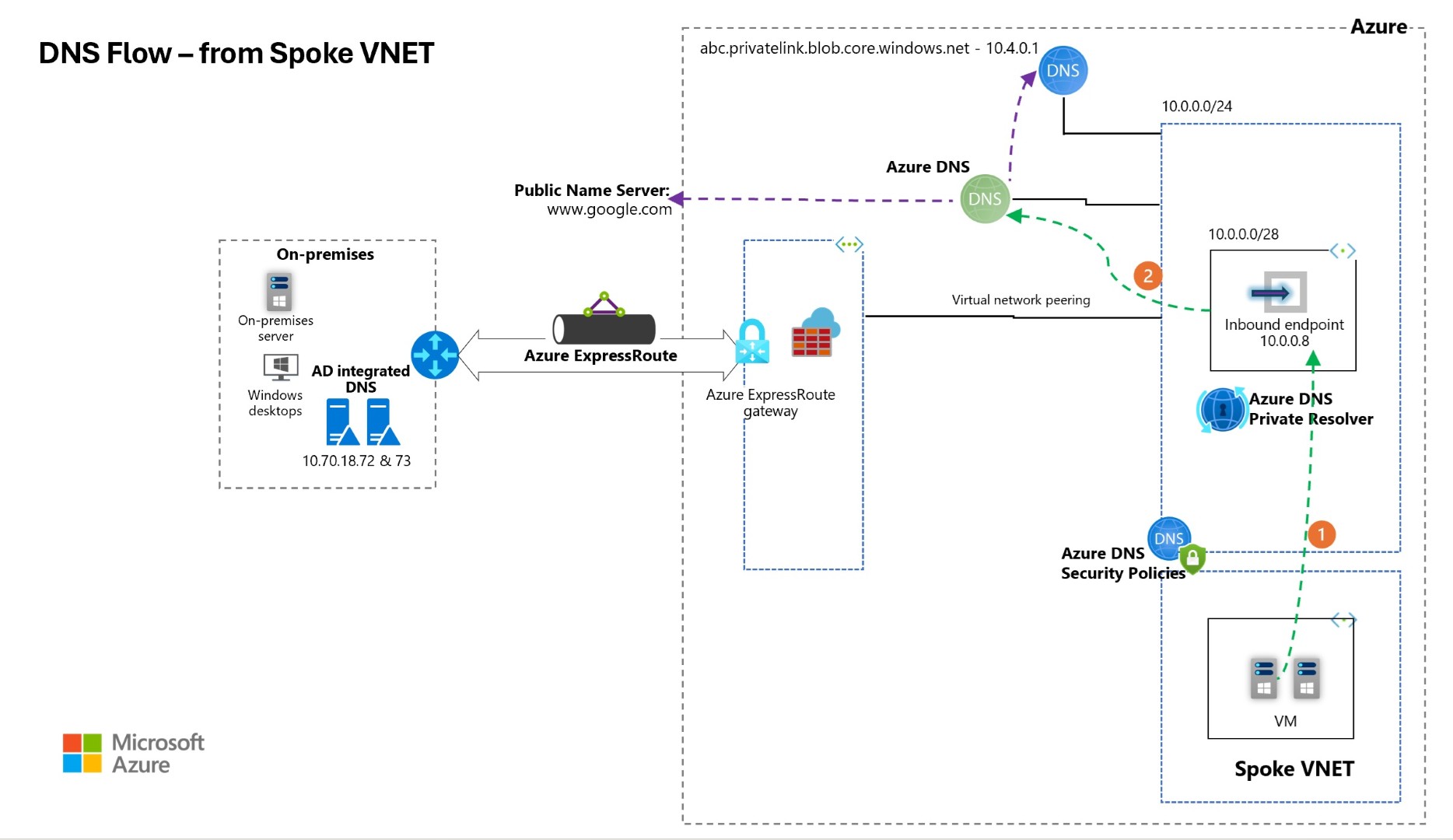 Download the architecture diagram
Bonus Tips
Here is the same pricing which I’ve done for one private DNS Resolver which contains only inbound endpoint, and 1 DNS security policy. For DNS Security Policy I’ve considered 10 Million DNS queries and in the domain list I’ve factored 1000 domains which will be inspected.
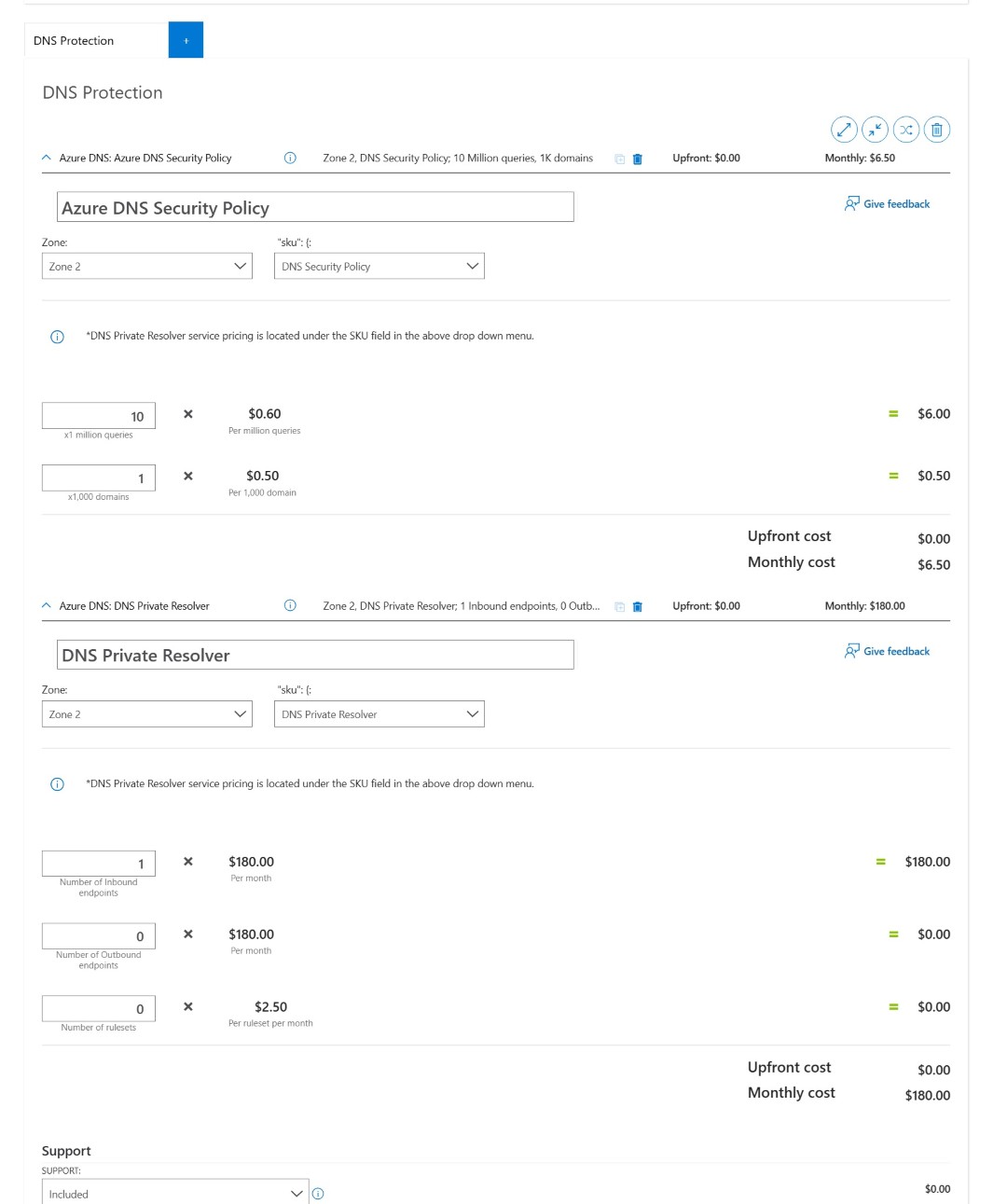
https://azure.com/e/8642dbd57b45475aaf9a697b1e608c24
More information here:
https://azure.microsoft.com/en-us/pricing/details/dns/?msockid=0dbf3937f36e6c1b13722f1cf2966d51
I hope this helps you in securing your DNS environment.
Happy Learning!
Subscribe to my newsletter for the latest posts and summaries. Your privacy is paramount, and your email stays with us securely. click the link to submit your email. https://forms.office.com/r/6ysKm4nkp4